
How to Search for a Motley County Warrant
There is no countywide Motley County warrant index. For a JP citation, the official county page sends users to nCourt. A city ticket goes to that city’s municipal route; county or district criminal records start with the County and District Clerk. The sheriff’s page is a contact source, not a search box.
Gather the citation or cause number and the court name. Use a date of birth only when the clerk asks for it to separate similar records. For a serious matter, get legal advice before making an appearance plan.
- Read the citation or court paper to identify the issuing court and number.
- For a JP matter, choose Citation/Ticket Number or Case/Cause Number on nCourt.
- For a city matter, call the city and request the municipal-court clerk.
- For county or district records, call the clerk; for service questions, call the sheriff.
- If a record copy is needed, make a written request for an existing document and ask about access limits.
Start With the Motley County Issuing Court
A generic web search may surface old pages or records from a different court. The Texas Courts FAQ explains that Texas has no single trial-court case lookup and directs the public to the appropriate clerk. That is the useful first distinction for Motley County.
Use the court name printed on a ticket or notice. If it is missing, call the County and District Clerk or JP and ask which office owns the case. A sheriff can route a service question, but a judge or clerk controls the court’s case status.
Motley County Warrant Search Fields
The JP’s nCourt form asks for a citation/ticket number or a case/cause number. It does not show a name, date-of-birth, warrant-number, active/inactive, or court dropdown field. Do not enter private identifiers that the form does not request.
| Field Label | Type | Required | Notes |
|---|---|---|---|
| Citation/Ticket Number | Radio option and number field | Search type selectable | Include letters; example 123456A. If a leading zero fails, try without it. |
| Case/Cause Number | Radio option and number field | Search type selectable | Use the number assigned by the JP court. |
| Enter Citation/Case Number | Text box | Required to search | The form shows a Search button. |
| Warrant number or name | Not shown | Not available | No warrant-specific field, name search, or status filter appears. |
Motley County nCourt Number Rules
The county-linked Motley County JP portal has five steps: Citation Search, Terms Agreement, Payment, Receipt, and Record Search. A citation may include a letter. The instructions give “123456A” as a format example and say to try without an initial zero if the number fails.
The site says to wait five days from the citation date before trying online payment. A delayed record or rejected number should lead to a call to the JP, not a conclusion about whether a warrant exists. The screenshot below shows the portal’s local-facing lookup.
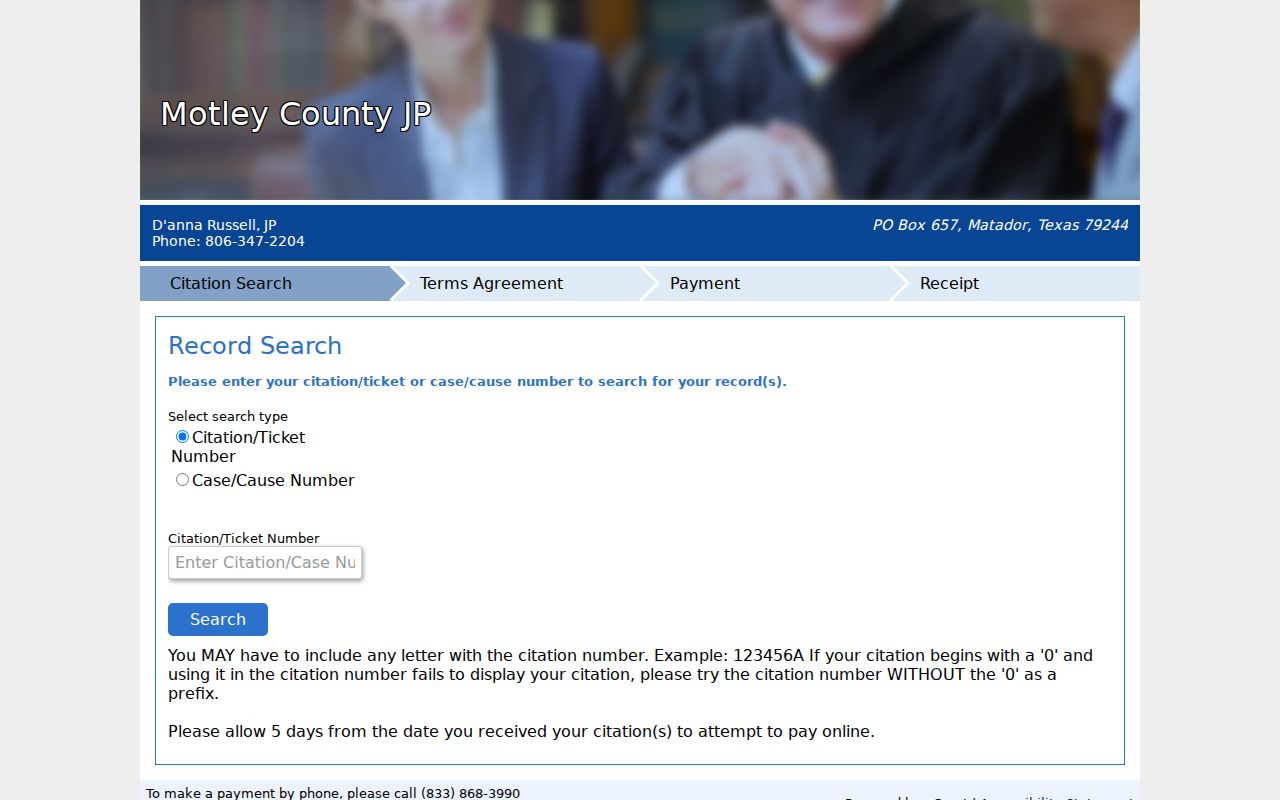
The form is a ticket and case lookup/payment route, not a countywide warrant status page.
What a Warrant Search Returns
A matched JP entry may show a citation or case record and a payment path. The public portal does not state that every capias or warrant field appears there, and the county did not publish a sample warrant or local number format. Confirm a possible match with the court before relying on it.
| Identifier | Citation/ticket or case/cause number; no local warrant-number format was published. |
|---|---|
| Record type | Portal scope is JP citation/case lookup and payment, not a full warrant inventory. |
| Issuing court | Confirm the court with the JP clerk or the court named on the notice. |
| Balance | Read the vendor terms and displayed amount; ask the court about payment or hearing options. |
| Warrant status | No public capias-status field is described; ask the issuing clerk directly. |
iDocket Is Not a Motley Warrant Index
The county clerk links to iDocket for account-based case and recorded-document research. The vendor advertises searches by party, filing date, attorney, county or court, bondsman, state, and cause number, but an account is required and there is no warrant-specific field documented.
iDocket disclaims the completeness and timeliness of its information and directs users to the official clerk for accuracy. Treat it as a research aid. A clerk can tell you whether the result is the right file and what public record can be requested.
Where Motley County Warrants Are Checked
The County and District Clerk handles county and district records; the JP keeps justice-court citations; city offices route ordinance and municipal matters; and the sheriff is the local service and law-enforcement contact. Each office answers a different question. A record search in one place may not include another court.
TCIC is for law enforcement, not public use. OmniBase is a separate DPS route for FTA/FTP license holds. For a federal case, Motley County channels do not apply; use the Northern District of Texas, Lubbock Division.
Motley County Courthouse Phone Fallback
The courthouse main number is (806) 347-2621, and posted public hours are weekdays 9 a.m. to noon and 1 p.m. to 5 p.m. The JP page lists (806) 347-2204 and morning hours from 9 a.m. to noon. The lunch closure can matter when planning an in-person records question.
Before traveling, call the county clerk or JP office and identify the record needed. No separate warrant counter, after-hours desk, or public appointment process was documented.
Access and Restricted Warrants
Texas open-records law applies to existing public records, but it does not make every warrant file immediately available. An active investigation may support a withholding exception, and juvenile arrest-warrant materials have specific confidentiality rules. Ask for the record by court and case number; the clerk or law-enforcement body decides whether to release or redact it.
Key Rules:
Government Code Chapter 552 allows exceptions, including some law-enforcement records tied to an active investigation.
Family Code §58.010 makes juvenile arrest warrants and supporting complaints or affidavits confidential except for authorized access.
Article 15.26 addresses executed or returned arrest-warrant records; a blank portal result is not proof that no process exists.
Request Existing Motley County Warrant Records
A written Texas Public Information Act request can seek an existing warrant, affidavit, return, docket entry, or recall order. Name the office and court, include the cause number or date range if known, ask for electronic copies, and request an estimate before copy charges apply. The county’s live policy page gives the current submission route.
A records request is not a motion to recall and cannot ask the clerk to create a new all-warrants list. Use the court’s case process for a hearing, appearance, or resolution decision.